Thursday, November 26, 2015

ESSENTIAL INGREDIENTS FOR YOUR FACEBOOK PAGE

1. A Memorable Tagline

A great tagline will help brand your business and leave a permanent mark in the mind of your fans. 

Be sure you pick a tagline that is easy to remember -- and one that will make people think of you when they hear the signature phrase. 

For example, no one can forget that “Just Do It” is Nike’s slogan. 

The company wants to show consumers it isn't just an athletic brand, it's a state of mind – anything is possible, so…

Just Do It!

Ask yourself what’s one thing you do better than anyone else -- and how can you share that in just a few words?

A few brands that did a great job (because they get stuck in my head) are:

L’Oreal: “Because You’re Worth It”

MasterCard: There are some things money can't buy. For everything else, there's MasterCard.

State Farm: “Like a good neighbor, State Farm is there.”

2. An Effective Bio

Your Facebook bio is an introduction to your fans. 

When writing your bio, you should be entering information that is going to present you in the best light to potential customers. 

Always try to answer the buyer’s question, “What’s in it for me?” 

So where do you start?

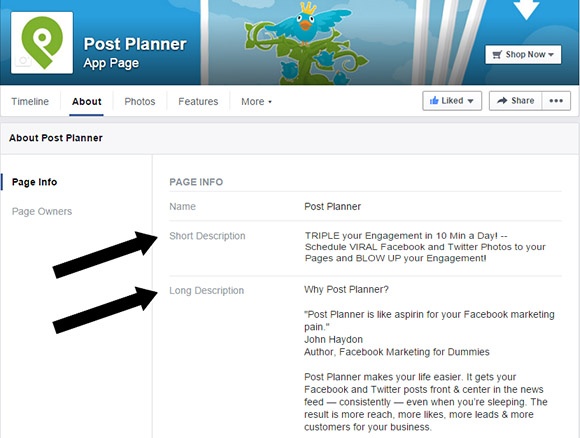
Create a 150 and 300 word bio for your short and long description. 

Add in details about your skills, talents, awards, and how you help clients. 

And don’t forget to include keywords to help people find you and know what you’re all about!

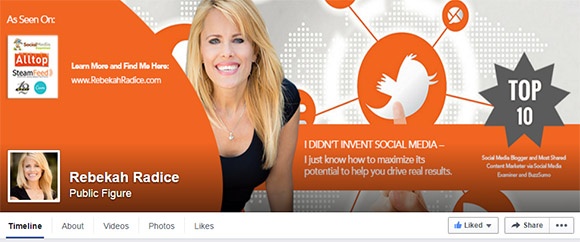
3. A Branded Cover Photo

One of the first things people will see is your cover photo. 

It’s a perfect place to brand your business and tell your story.

Use it to promote your products, share what’s happening within your business, or talk about upcoming events.

It’s also a good idea to switch it out often.

The changing visuals will be sure to grab the attention of your fans.

4. A “Call to Action” to your Website

Facebook has an awesome feature called the “Call to Action” button. 

It allows you to direct fans to a product, service, your latest webinar or even a book.

There are 7 call to action buttons altogether:

Book nowContact UsUse AppPlay GameShop NowSign UpWatch Video

These CTAs help bridge the gap between your fan page and your digital assets.

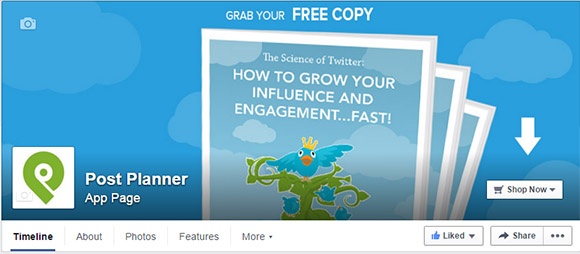
In addition to adding the CTA to your page, it’s a good idea to use your cover photo to draw attention to it.

For example:

In Summary

Your Facebook page is an extension of your brand.

In order to grow your fan base and increase engagement, you need to be leveraging all the opportunities Facebook provides.

By including a memorable tagline, effective bio, branded cover photo, and a clear call to action, it sets a solid foundation for all future engagement efforts. 
Source LEEANN

VISUAL MARKETING IDEAS FOR FACEBOOK

1. Get a mascot

Does your company have a mascot? Mascots can do wonders on Facebook. Yes, you read that right. WONDERS! That's because they add personality (with flare) to your business.

Even if you don’t have a company mascot, you can use an unofficial mascot for your company. Have a team dog? Cat? Or maybe a hamster? Use your animal friends to spice up your Facebook Page.

2. Embrace a special unofficial day

Every day is an (unofficial) special day.

For instance, my calendar says today is loaded with events:

National Sponge Cake DayHug Your Sweetheart DayRide the Wind DayValentino DayGo Topless Dayand more...

Imagine all the fun content you can create around these rather unusual observances.

The key here is to find days that would fit your audience. This means you need to know your demographic and what they like inside out! Then you can create themed content around days they've yet to hear about.

3. Remember to un-market

Here’s the thing, consumers don’t go to Facebook to think about brands. Why? They're looking for a personal connection with their friends.

The key to un-marketing is to market without looking like you’re selling at all. Just be a friend.

Themes the audience can relate to draw people in.

Even if you operate a small business or local business, you too can stand out. Creativity doesn't take a ton of money, but it does take some thought.

Share what your product stands for.

What benefits does it offer? If your product saves people time, show your fans what they can do with all that extra time -- visuals of them at the park? Traveling? 

Look beyond what your products and services do. Look at what they provide.

Finally! Marketing on Facebook shouldn't be boring. You need to be creative if you want your brand to be heard by your share of Facebook's 1.49 billion users.

While it’s tough to stand out, it can be accomplished.

Keep your brand fun, engaging and always add value! Try these 3 visual marketing tips to help take YOUR Facebook marketing to the next level!

HOW TO CREATE FACEBOOK ADS THAT WORK!

How can my business make money off Facebook ads?

Facebook ads CAN help just about any business. However, there's one caveat: If a business doesn't have the resources, commitment or personnel -- Facebook ads are likely to fail.

And that makes sense: With over 1.49 billion users, Facebook is big enough for you to reach just about any demographic. However, without the proper resources and commitment, carving out that demographic can be intensely challenging. 

Facebook Ads are great so long as you know exactly how you want those ads to convert and have rightly determined your target audience.

list of the the things businesses should watch out for with Facebook ads:

Getting too cute with the customization of bidding

Making a mess out of targeting

Not knowing how to measure success

How much should businesses budget for a Facebook ad?

Don't spend too much until you find success and know what you're doing

Base your budget on your audience size

Start with a little. If you can earn a solid return, then raise the ante.

What are the key elements of a great Facebook ad?

You have to take many things into account:

The product
The audience
The copy
The imagery
The landing page
The bidding
The optimization

Creating an ad is one thing, but to succeed you must measure and measure again. It's a simple business principle: You can't manage what you can't count.

Which metrics should marketers pay close attention to when measuring the success of a Facebook ad campaign?

Pay close attention to Cost Per Desired Action. we shouldn't "obsess" over CPC, CTR, CPM, etc.

The reason why you want to isolate the Cost Per Desired Action is so that you can measure ROI. How many Likes, Conversions, Sales or Leads did you get per dollar spent on your ads? And how much revenue directly resulted?
You must be clear and concise about what you're offering. 'Calls to Action' are crucial!

key ingredients to creating Facebook ad copy that converts

Consider the objective and the audience, Sometimes long copy works. Sometimes it's short copy. Sometimes CTA.

There isn’t ONE formula that can guarantee a successful campaign, it’s all about continuous testing. Further, we are all adaptive, when we see the same thing over and over again, we simply tune out.

Wednesday, November 25, 2015

USING SOCIAL MEDIA TO DELIVER OUTSTANDING CUSTOMER SERVICE

Customer service via social media empowers businesses to solve problems on-the-fly and build trust through transparency.

Social Media has enabled customer service visible in a way it was not before. Brands now have to deal with things publicly.

Social Media has made it easier for complaints to spread, it demands companies to be there.

How can businesses use social media to support objectives and build/maintain customer relationships?

Be customer focused. Be sure your posts are on topics that resonate with the brand you are hoping to build.

Be more human! Start treating your #socialmedia profile more like a personal page than your business/brand page.

Social is a canary in the mine: If you’re listening, your customers will tell you how to improve & what you are doing right.

How does customer service support on social media directly impact reputation management? 

People do business with people they like. By connecting on social, more people may do business with you.

If someone has a bad experience, there are going to tag you and make sure everyone knows so brands are more conscious now. ‏

Customers take a brand's pulse through their social media networks. Those channels need to be alive with activity.

How can a small business maintain a high level of customer service on social media without outsourcing?

You can't win on every transaction, but by replying on social media it shows that you make the effort.

A small business can designate just one person for #socialmedia and remain more consistent.

Small businesses may even benefit more by bringing their human factor and continue to be more personable.

How can small businesses keep up with all the social platforms available today?

Even a small business has someone attending to emails. That person should monitor social mentions as well.

Focus! Don't be everything to everyone. Spend the most time where your people are, before you try to grow the next platform.

Don't try to be all things to everyone, everywhere. Pick a channel or two your customer age group will likely use & focus there.

How fast should companies be expected to respond on social media?

We've seen that the expectation for small business is a 24-hour window for response.

"I want a QUALITY answer in 24 hrs".

As fast as you can. Customers don't like to be kept waiting. Most probably not more than a day. 

CONCLUSION

Social media has changed customer service forever.

Today, we simply don't have the patience (or spare time) to call customer support (only to be put on hold for an hour). We want microwave-speed for everything -- customer service included.

As a consumer, I expect businesses to listen to me and respond quickly. The faster and more favorable the response, the happier and more loyal I'll be to their brand.

There's plenty of room for improvement, though. 

Tuesday, November 24, 2015

USING INSTAGRAM FOR BUSINESS

Are you using Instagram for business?

Most businesses still haven't fully discovered the powerful tool.

There's lots of low-hanging fruit if you do it right.

From using instagram hashtags  to choosing good instagram names -- there are so many ways to promote your business on Instagram.

No, it's not the place for a hard-nosed sales pitch! It's a network of beautiful images & pleasant conversations.

And it's mobile! -- just like your customers. So don't waste any more time. Get your business on Instagram today.

But do it right by follow the 10 crucial to-do's below:

10 Crucial To-Do's when Using Instagram for Business

Before you try to figure out what to post on instagram  -- let's take a step back to make sure we grasp the fundamentals.

1. Get Your Business on Instagram

Make sure to sign up as a business when you launch your Instagram account. Don't use a personal account for marketing.

This probably means not using Facebook to log in to Instagram -- since it's tied to your personal profile.

Use the name of your business on the account & post your logo as a profile pic.


2. Decide on a Brand Strategy

Why should your business even be on Instagram?

Answer this question before you take another step.


Is it:

to sell products?

to entertain followers?

to drive traffic to your website?

Start by deciding on a clear strategy that makes sense for your company.

3. Edit Share Settings

Instagram makes it easy to share photos to your other social profiles.

Make sure your business account is connected to your:

Facebook page, Twitter account, Google+ page,  Foursquare, Tumblr, Flickr. 

4. Maintain Consistent Themes

Smart social media marketers use a consistent style, look & feel on all the photos they post on Instagram.

This strengthens branding & helps you get more instagram followers 

A custom filter will help your pics stand out!


5. Embed Instagram Photos on Website

Embedding Instagram posts on your website is easy.

And it's a great way to drive traffic from your blog to your Instagram account.


When embedding an Instagram post, you might not see it populate while editing -- but it should show up live.

I've also noticed that embedding more than one Instagram post causes none of the embedded posts to appear online.

So experiment with just one embedded photo per post at first.


6. Be Ready for Instagram Ads

Instagram has start selling ads.

And smart businesses will get in on the ground floor.

I'm still not sure how Instagram ads will work, but I'm sure Post Planner will be using them.


7. Reward the Loyalty of Your Followers

Instagram followers tend to be very loyal -- more loyal than fans & followers on other social media websites.

So use Instagram to reward their loyalty with exclusive deals.

This is also an easy way to track sales -- if you use a custom shortcode URL

8. Post Regrams

When someone tags your company on Instagram, share that post with your followers.

You can't share on Instagram with the Instagram app, but there are iOS & Android tools that provide this function 

And it works!

People love it when you send a so-called "regram".

And it's always nice to give a shout-out -- especially when your brand is mentioned!

9. Run Photo Contests

People love winning free stuff!

And Instagram is a great place to run a photo contest for your followers. 

To get started, announce the contest on Instagram & require users to post a custom hashtag to participate.

It's free publicity (except for the prize, of course).

10. Spotlight Your Employees

Instagram is about connecting with people in authentic ways.

An easy, entertaining way to do this is by snapping photos of your employees at work.

Your followers will love seeing faces from behind the scenes

SETTING GOOGLE ANALYTICS GOALS

There are quite a few tracking features in Google Analytics for which you have to do a bit more than just implement the UA-code on your pages. One of those features is the ‘goal’. The goal is a feature in which you can track one of the following things:

how many people reach a designated page,how many people stay on your site for a minimum amount of time,how many people have viewed a minimum of pages on your website,how many people have triggered an event (such as watching a video).

We’ve noticed that people are often having trouble setting up these goals in Google Analytics. Not only are they getting stuck on how to set them up, but also on which goals to set up.

Why Should I Make Goals?

Goals give you an enormous amount of extra and valuable information. With goals you can track if people are doing on your website what you want them to do. There are always multiple things that people could do that would benefit you, so tracking how many people are doing that is invaluable.
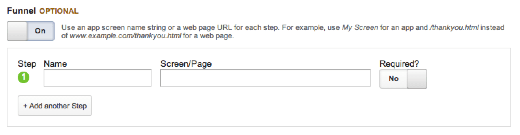
However, that’s not all. When you set up goals, you have the option to set up multiple steps, if you turn the option ‘Funnel’ on:

Use the Funnel Option

A funnel is basically the process people go through to buy one of your products, or to sign up for your newsletter. You can set up as many steps as you want, but I think the only reason to add a step is when it’s required. If a step is not required, it’s not part of your funnel, because people can also come from other pages. People will have to have viewed your page on a specific product, before they can actually add that to the cart and buy it.

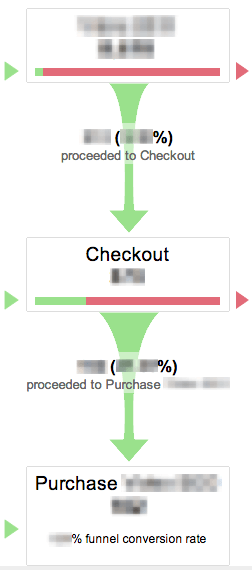
But the best thing is yet to come! When you’ve set up a goal with a funnel, you can actually see how that goal is doing in the ‘Funnel Visualization’. This is a very graphic and easy to understand view of what’s happening with your goal:

As you can see, it shows how many people entered every step, how many people went through to the next step, and how many people dropped off on every step. This makes it very clear where in your funnel things could be improved. And it shows you the percentages and the overall funnel conversion rate. How’s that for useful?

Imagine This

If you have a webshop, you usually have a lot of products. When this amount keeps growing, it’ll be hard to keep track of how each product is doing regarding sales. Setting up your goals with funnels as I’ve shown above, will give you insight in how your products are doing, as well as showing you how the related pages are doing.

You’ll be able to see if your product page is actually getting people to add that product to their cart. And when people have added the product to their cart, you’ll be able to see how many of them actually bought the product in the end. And you can see all that in the Funnel Visualization.

How do I Make Goals?

You can create goals in the ‘Admin’ section of your Google Analytics. The Admin tab is found in the top right when you’re logged in to Google Analytics. Make sure you have the right account and view selected. When you’ve clicked admin, there will be three “columns”, of which the most right will look like this:

You can click goals where I’ve highlighted it. When you haven’t created any goals yet, you’ll see this:

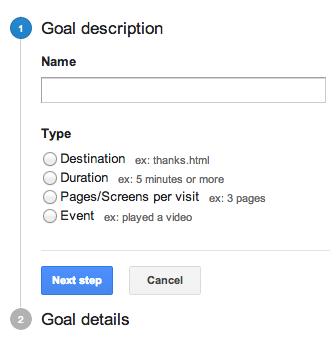
As you can see, you have a default of 20 goals. To get any more, you need to pay, unfortunately. Click create a goal will give you this screen:

Making a goal using ‘Destination’ allows you to make a goal for people always ending up on a certain page. For instance, if you have a contact form, and your contact form has a confirmation page, you can track everyone who’s entered your confirmation page.

‘Duration’ allows you to track everyone who’s spent more than the minimum amount of time you set on your website.

‘Pages/Screens per visit’ does the same thing as ‘Duration’, just with pageviews. When people hit a threshold of a minimum amount of pageviews you’ve set, they’ll count as a goal completion.

The ‘Event’ goal is the hardest. This requires actual coding, as events need to have been set up first. However, they’re pretty powerful if you’ve set them up. This way you can track how many times a video on your website was played, for instance.

Regular Expression Goals

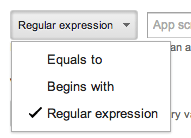
When you’re creating ‘Destination’ goals, you’ll find you have these options:

The ‘Equals to’ is simply that. The URL people visit has to exactly match the URL you put in there. So if you have any campaign variables, or a subpage, it won’t be counted towards the goal.

The ‘Begins with’ is exactly the opposite: everything beginning with the URL you entered will be counted toward your created goal.

The hardest on there, however, is the ‘Regular expression’ goal. At the same time, this is the most powerful and precise option of the three. Regular expression, or regex, is a sequence of patterns that, if you know how to use them, can be very specific in its targeting.

Lets say you have a webshop with over 20 products, so you can’t fit them all in your free Google Analytics account. What you could do is create a goal for every brand you’re selling, using regex goals. Your destination goal will simply be the confirmation page after your checkout. And, if the brand you were wanting to track was Yoast, you could add a regex line like this:

/(.*)/yoast/(.*)


This expression will simply track everything with /yoast/ in the URL. You have to be aware that every step in a regular expression goal and funnel should be written in regex. Also, be sure that your regex doesn’t match any other goals, or it will simply be counted twice.

What Goals Should I Make?

“I have too much data!”, said no one, ever. Of course, people will be saying it from time to time, but you get my point. If not, here it is: try to make as much useful goals as you can think of. And there’s one very important word in that sentence: useful. There are literally millions of things you can think of to set up goals for, but most of them will probably be completely useless for your website and/or business.

And that’s where the actual thinking comes in. You have to think about what you want your visitors to do on your website. Let me give you an example of what would be good goals for a webshop, in general:

A goal for every product you have in your webshop, or, if it has more than 20 products: A regular expression goal for every product category/brand. A goal for your newsletter signup, A general goal for your sales.

Of course, you can be far more specific by tracking, for instance, how many people have viewed your product video, or how many people left a review of your product. It all comes down to thinking about what your website is for, and what you want people to do on it.

Assign Value

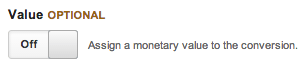
Assigning value to your goals is important to be able to distinguish between your goals. If you don’t assign a value to your goals, you simply can’t see which of the goals is your most profitable goal. There are three ways in which you can assign values for your goals: actual values, average values or relative values.

Actual Values

Lets say you offer a few services, all of which have one fixed price. People can hire you for these services, and they have to pay up front. In this case you should simply assign that price as the value of each goal representing a service. That way, you can simply see how many times a goal was completed and thus one of your services was successfully requested.

In this case it’s important that people actually have to pay up front, because otherwise you’ll run into some trouble. Because even though the prices of your services are always the same, if people don’t have to pay immediately to finish the goal (order a service), there’s always the possibility they just won’t pay.

Average Values

When people don’t have to pay up front, or you offer services or products that can have different prices (such as our plugins), or the specific goal generates leads, you need to assign average values. Average values have to be calculated in three different ways for the three options I just mentioned.

When the prices of your products can differ, you simply take the average order value of the last period (at least one month). This way you’ll have a general estimate of what each order will earn you, on average. When people don’t pay up front, there’s always a percentage of people that simply won’t pay, even after requesting the service. You’ll have to find out what that percentage is. If your service costs $100, and 40% of the people won’t pay, your assigned value should be set to $60.Things that don’t have a direct value to them, such as newsletter signups or social media shares, can still earn you money in the end. This is what people call ‘lead generation’. The best way to assign relative values would be if you knew the lead conversion rates. This means you know how many social media shares, for instance, it takes to sell one of your products/services. If it’s 1%, this would mean every share with a $100 service would be worth $1.

Relative Values

If you’re making goals for things that don’t actually earn you money, you can assign relative values. Relative values are simply values that show you which of the goals are worth more to you. So, if you prefer people signing up for your newsletter over liking your Facebook page, you could assign the newsletter signup goal a value of 2, and your Facebook like goal a value of 1. Or, if you think twice as much is too much, you can assign them values of 3 and 2 respectively.

These numbers are then obviously completely made up, but it’ll still help you differentiating between each goal.

Doesn’t This Take a Lot of Time?

This all depends on how big your website is, of course. However, if you own a webshop with a lot of products, the answer is simple: yes. Although it can be hard to find the time to set this all up decently and correctly, in the end it will always be worth it!

Of course, you could always ask us to set up your goals for you. Google Analytics isn’t exactly known for its usability, so it could save you quite some time.

Summary

So there’s a few tips I have for you:

Think about what you want to have goals for, especially if you’re on a free Google Analytics program:

your goal space is limited;Use the funnel option.
This makes the data from your goals far more insightful;If you understand regular expressions: use them.

They’ll give you far more power and specificity than any of the other options;
Add value to your goals so you can actually compare the performance of the goals.

SOCIAL MEDIA REPUTATION DOS AND DON’TS


Let’s talk a little about what you should be doing as you plan for and then execute your social human makeover.

1. Define Your Audience

You wouldn’t use the same voice when talking to an infant and a corporate executive. Both have specific likes and dislikes, and both audiences have expectations about what you might say and how you might behave.

Those same rules apply on social media. Using the same voice when talking to consumers shopping for coffee and patients shopping for a heart surgeon can lead to disaster. One group might appreciate a hip tone, while the other might prefer for you to keep things formal.

Before you hop on this trend, take a few moments to really think about what audience your company serves, and what your company stands for. You might find that formality is your best bet, and if so, you might need to tune down your humanizing plans.

2. Give One Person Control

When it comes to branding, consistency is key. Consumers that follow your voice on one channel will expect to hear that voice and only that voice when they visit that channel. And should they skip from one channel to another, they might be reassured to hear that same voice again.

As you make a shift, put one person in charge of your posts. Let that person do all of the writing, updating, and promoting. Once that person has the voice down well enough to write a style guide, those responsibilities can be shared. But at first, just one person should do the writing.

3. Devote the Time

When you’re using social media like a business, consumers might expect delays in responses. They might understand that you have other things to do, so you might not sit on the social page all day long. But, when you are running the site like a human, your customers might expect you to use the site in the way a human might.

Consumers spend about two hours per day on social sites. Chances are, they aren’t spending that time in one big block. They’re probably logging on, checking a few things, and then getting back to work or real life. Your social team should do the same. A nearly constant presence can help you address issues as they appear, and you might be able to start conversations with your fans in your new human voice.

4. Consider Emoji

Can’t think of what to say? Use emoji. You certainly won’t be alone if you add sparkle to your words with little smiles and clapping hands,  some 74 percent of online users  use emoticons or emoji in their online notes.

Just make sure that there are actual WORDS in your posts, too. A post made up of simple images is hard to parse, and it doesn’t give you the opportunity to really amplify your brand message. Stick to using emoji as emotional amplifiers and you’ll be on the right track.

Think your readers are docile and tame? Think again. Use the wrong social voice, and the claws could come out.


As I mentioned, getting real could be really hard on your reputation, especially if you get slapdash about the whole process. Here are a few things to avoid.

1.Disrespecting Your Customers

Sure, you’re using a hip and human voice. But that doesn’t give you a free pass to call out your detractors on your corporate social site. Chances are, you can think of some real zingers to share when people attack you, and those might be statements you would throw right down on your private site. But you should never, ever use them on your corporate site. Just don’t do it.


2. Make Light of a Serious Situation

A human voice can help you share a story about your brand, your company, or your employees. But there are some issues that are so serious that they demand a shift in tone. If someone hits your page with a complaint that is serious enough that you start to think of calling in the legal team, start shifting.

You can use your new, human voice to ask the person to contact you in person, off social, to speak about the issue. But do not use your social channel to riff on the issue. At best, you’ll look callus. At worst, you’ll look like you’re hiding something. Just don’t do it.

3. Degrade Your Brand for a Laugh

Remember, you can be human without being offensive. If you are tempted to poke fun, take a step back.

Final Thoughts

If a human voice supports your brand and your company, don’t be afraid to give it a go. Just make sure to take it slow and be mindful.